Pixma Tr4520 Specs, Features, and Value: Is it worth the price tag?
In the landscape of modern home offices, the printer remains a cornerstone of productivity. While many tasks have shifted to purely digital formats, the need for physical copies of contracts, academic assignments, shipping labels, and family photographs persists. The Pixma Tr4520 is positioned as a versatile, entry-level all-in-one inkjet printer designed specifically for users who need a compact footprint without sacrificing the core functionalities of a traditional office machine. This article provides a comprehensive analysis of its technical specifications, real-world utility, and overall market value to determine if it truly justifies its cost for the average consumer.
Understanding the Entry-Level Workhorse
The Pixma Tr4520 belongs to a class of electronics often referred to as "bridge" devices—products that sit comfortably between low-cost personal gadgets and high-end professional equipment. It is an All-in-One (AiO) printer, meaning it combines printing, scanning, copying, and faxing into a single unit. For many home users, the inclusion of a fax machine might seem like a relic of the past, yet for small business owners or those dealing with legal and medical documentation, it remains a critical requirement. This multifunctionality is the primary selling point of the Tr4520, promising a comprehensive solution for a variety of document-handling needs.
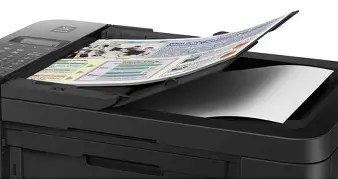
Design-wise, the unit is characterized by its matte black finish and relatively small dimensions. Space is at a premium in most modern homes, and this model is engineered to sit on a standard bookshelf or a small corner of a desk. Despite its compact size, it manages to integrate a 20-sheet Auto Document Feeder (ADF), a feature often missing from budget models, which significantly enhances its appeal for those who frequently scan or copy multi-page documents.
Technical Specifications and Core Performance
To evaluate the value of the Tr4520, one must look closely at what is happening under the hood. The printer utilizes a fine hybrid ink system, which combines pigment-based black ink for sharp text and dye-based color inks for vibrant photos. This dual-approach is common in the industry but particularly effective in this model for producing professional-looking documents that resist smudging.
Print Quality and Speed
Print resolution is a key metric for any buyer. The Tr4520 offers a maximum color resolution of 4800 x 1200 dots per inch (dpi). In practice, this satisfies the requirements for high-quality school projects and standard 4x6 photo prints. While it may not rival dedicated professional photo printers used by galleries, it exceeds the expectations set by its price point for general household use. Text output is crisp, with deep blacks that remain legible even at smaller font sizes.
Speed is where the trade-offs of an entry-level device become apparent. The Tr4520 is not built for high-volume environments. It clocks in at approximately 8.8 images per minute (ipm) for black and white and about 4.4 ipm for color. For a student printing a ten-page essay or a parent printing a few coloring pages, this is perfectly acceptable. However, for a user attempting to print a 100-page manual, the pace may feel sluggish. This distinction is vital for prospective buyers to understand; this is a device designed for low-to-medium volume tasks.
Scanning and Copying Capabilities
The flatbed scanner provides an optical resolution of 600 x 1200 dpi. This is sufficient for digitizing documents for archival purposes or scanning photos to share on social media. The integration of the ADF is a standout feature. It allows the user to stack up to 20 pages and walk away while the machine processes them, rather than manually placing each sheet on the glass. This functionality bridges the gap between a basic home printer and a more advanced office copier.
Paper Handling and Connectivity
The printer features a front-loading paper tray that holds up to 100 sheets of plain paper. It supports a variety of sizes, including Letter, Legal, 4x6, 5x7, and 8x10 inches. One of its most praised features is the Auto Duplex Printing capability. Many budget printers require the user to manually flip pages to print on both sides, which is time-consuming and prone to error. The Tr4520 handles this automatically, which not only saves time but also reduces paper consumption by up to 50%.
Looking for the best Electronics deals on Amazon?
Browse Now →In terms of connectivity, the Tr4520 is well-equipped for the modern "wireless" world. It supports Wi-Fi, allowing users to print from computers, tablets, and smartphones without a physical tether. It is compatible with major mobile printing platforms such as AirPrint for iOS devices and Mopria for Android. Furthermore, it integrates with various cloud services, enabling users to scan documents directly to folders in the cloud or print documents stored remotely.
Comparative Analysis: How It Stands Up
To put the Tr4520's features into perspective, it is helpful to see how it compares to other common configurations in the same electronics category. The following table highlights the differences between a basic inkjet, the Tr4520, and a higher-tier office model.
| Feature | Basic Personal Inkjet | Pixma Tr4520 (AiO) | High-End Office AiO |
|---|---|---|---|
| Functionality | Print Only / Scan-Copy | Print, Scan, Copy, Fax | Print, Scan, Copy, Fax, Email |
| Automatic Document Feeder | No | Yes (20 Sheets) | Yes (50+ Sheets) |
| Auto Duplex (2-sided) | No | Yes | Yes (Single Pass) |
| Print Speed (Color) | 2-3 ipm | 4.4 ipm | 15-20 ipm |
| Paper Capacity | 30-50 Sheets | 100 Sheets | 250+ Sheets |
| Display | None or Simple LED | Full Dot Matrix LCD | Color Touchscreen |
Pros and Cons: A Balanced View
Every piece of electronics has its strengths and weaknesses. The Pixma Tr4520 is no exception, and its value is largely determined by how well its "pros" align with a user's specific needs and how much its "cons" interfere with their workflow.
Potential Advantages
- Comprehensive 4-in-1 Design: Having fax and scan-to-cloud capabilities in such a small device is a significant benefit for those working in administrative or legal fields from home.
- Automatic Two-Sided Printing: This feature is rare at this specific price point and is excellent for eco-conscious users and students who need to print long reports.
- High Versatility in Connectivity: The ability to print from a smartphone via a dedicated app or third-party services makes it extremely convenient for modern users who do not always want to boot up a laptop.
- Compact Footprint: It is designed to be "desk-friendly," meaning it won't dominate your workspace, making it ideal for dorm rooms or small apartments.
- Ease of Setup: Modern software wizards make the wireless connection process relatively straightforward, even for those who are not particularly tech-savvy.
Potential Disadvantages
- Two-Cartridge System: The printer uses one black cartridge and one tri-color cartridge. If you run out of yellow ink but have plenty of cyan and magenta, you must still replace the entire tri-color unit, which can be less cost-effective than individual color tanks.
- Relatively Slow Print Speeds: As noted, this is not a device for people in a hurry. Large print jobs require patience.
- No Ethernet Port: Connectivity is strictly through USB or Wi-Fi. In environments with unstable wireless signals, the lack of a wired network port could be a drawback.
- Limited Paper Capacity: With a 100-sheet limit, users who print frequently will find themselves refilling the tray more often than they might like.
Buying Guide: Who Should Consider the Tr4520?
Deciding whether to purchase the Pixma Tr4520 requires a look at your intended use case. Electronics value is subjective; a device is only worth its price if you actually use the features it provides. Here are three primary personas that the Tr4520 serves particularly well.
The Dedicated Student
Students often need to print essays, research papers, and syllabi. The auto-duplex feature is a game-changer for academic work, making documents look more professional and easier to store in binders. Since students often have limited desk space in dorms, the compact nature of this model is a perfect fit. The scanning feature is also helpful for digitizing handwritten notes or textbook pages for study groups.
The Casual Home User
For the household that prints occasional boarding passes, return labels for online shopping, and the occasional family photo, the Tr4520 offers excellent value. It provides high-quality output without requiring a massive upfront investment. The wireless printing means any family member can print from their own device without needing to transfer files to a main computer.
The Light Office/Solopreneur
Small business owners who need to scan signed contracts or fax occasional documents to government agencies will find the Tr4520 to be an affordable "all-in-one" solution. It provides the essential tools of a larger office machine without the high cost of a commercial-grade laser printer. However, if the business grows to the point where they are printing dozens of pages every day, they may eventually need to upgrade to a faster model with larger ink reservoirs.
Shop the latest Electronics picks on Amazon.
Shop Amazon →Assessing the Long-Term Cost of Ownership
When evaluating the value of a printer, the "price tag" mentioned in the title of this article is only the beginning. In the electronics world, and specifically in the printer market, the initial purchase price is often a "loss leader." The real cost emerges over the following years through ink consumption. The Tr4520 uses PG-245/PG-243 black cartridges and CL-246/CL-244 color cartridges. These are widely available, but they have a lower page yield than the "MegaTank" or "EcoTank" systems found in more expensive models.
To maximize value, users should look into High Yield (XL) cartridges, which cost more initially but offer a lower cost-per-page. Additionally, the printer is compatible with subscription-based ink delivery services, which can lower costs for those who print on a regular schedule. If you print fewer than 50 pages a month, the ink costs are manageable. If you print hundreds of pages, you may find that the low initial price of the printer is offset by high recurring ink costs, and a more expensive initial investment in a tank-based system might be wiser.
Real-World Reliability and Maintenance
Maintenance is a critical part of owning any inkjet printer. Inkjets work by spraying microscopic droplets through tiny nozzles. If a printer sits idle for months, these nozzles can clog as the ink dries. The Tr4520 includes built-in maintenance routines, such as head cleaning and alignment, which can be accessed through the LCD menu. While these routines use a small amount of ink, they are essential for preserving the longevity of the device.
Hardware reliability for this model is generally rated well for its class. The build quality is sturdy for a plastic-bodied device, and the hinges on the scanner lid and ADF are designed to withstand regular use. However, like most consumer electronics at this level, it is not designed to be repaired if a major mechanical failure occurs after the warranty period; it is largely a "plug-and-play" device intended for a several-year lifecycle of steady, light usage.
Final Verdict: Is it Worth the Price Tag?
To answer the question of whether the Pixma Tr4520 is worth its price, we must look at the balance of features versus cost. It is an incredibly well-rounded machine. Very few printers in this price bracket offer a 20-sheet ADF, fax capability, and automatic two-sided printing in such a small package. For the user who needs "a little bit of everything" without paying for high-speed industrial performance, the answer is a resounding yes.
Value, in this case, is found in the convenience. Having a single machine that can handle every document-related task a modern household might face removes the friction of daily productivity. You aren't just paying for a printer; you are paying for the ability to scan a document to your phone, fax a medical form, and print a two-sided report without leaving your desk. While high-volume users might be frustrated by the print speeds and cartridge yields, the average home user or student will find the Tr4520 to be a reliable and feature-rich partner in their digital and physical workflows. It represents a smart compromise that prioritizes essential features and space-saving design, making it a standout choice in the entry-level electronics market.