Head-to-Head: OnePlus Pad Go 2 vs Geekom Geekbook X14 Pro Laptop (Detailed Comparison)
The market for portable computing offers many choices, from compact Android tablets to ultra-light Windows laptops. This head-to-head comparison examines the OnePlus Pad Go 2 and the Geekom Geekbook X14 Pro, two devices that target portability and everyday productivity—but approach those goals from different angles. Presented in an objective editorial tone, the article walks through specs, real-world use cases, strengths and weaknesses, and a practical buying guide to help readers decide which device better matches their needs.
Introduction
Some buyers prioritize a light, tablet-first experience for media consumption, casual productivity and stylus-enabled note taking; others need a full desktop-class environment with a physical keyboard, legacy app support and richer ports. The OnePlus Pad Go 2 (an evolution of OnePlus's compact tablet line) and the Geekom Geekbook X14 Pro (an ultraportable 14-inch laptop) occupy adjacent but distinct positions in this space.
This comparison focuses on the most relevant criteria for typical buyers: display quality, performance for everyday tasks, battery life in real-world conditions, portability, connectivity and expandability, software and ecosystem, and value for money. The analysis references official specifications and widely reported behavior for comparable hardware to provide a realistic picture of what owners can expect.
Product overviews
OnePlus Pad Go 2 — compact Android tablet built for media and mobility
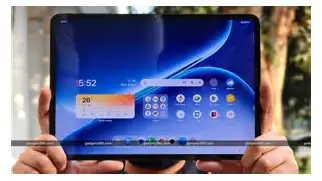
The OnePlus Pad Go 2 is positioned as a mid-range, lightweight Android tablet designed primarily for media consumption, casual productivity and light creative work with a stylus accessory. Key attributes include a near-11.4-inch LTPS/IPS display tuned for high refresh and color accuracy, a tablet-optimized Android skin, long battery life thanks to a large battery and efficient mobile SoC, and stereo quad-speaker audio for video and music.
Geekom Geekbook X14 Pro — ultra-light Windows laptop for productivity
The Geekom Geekbook X14 Pro is an ultraportable 14-inch clamshell laptop that emphasizes a premium OLED display, a full Windows software stack, and very light weight (just under 1 kg in many configurations). It aims to deliver more sustained compute performance than a tablet, a physical keyboard for extended typing, and a useful selection of modern ports such as USB4 and HDMI. For buyers who need Windows applications, developer tools or multi-tasking with full desktop apps, this device represents a portable yet capable option.
Key specifications (at a glance)
| Specification | OnePlus Pad Go 2 | Geekom Geekbook X14 Pro |
|---|---|---|
| Primary OS | Android 13 with OxygenOS tablet UI | Windows 11 (Pro or Home) |
| Display | ~11.35" LTPS IPS, 2408×1720, 90 Hz | 14" OLED, 2880×1800 (2.8K), 120 Hz |
| Processor | MediaTek Helio G99 (mobile octa-core) | Intel Core Ultra series (e.g., Ultra 9 185H / Ultra 5 125H) |
| Graphics | Mali G57 (integrated) | Intel Xe / integrated Arc-like graphics |
| Memory | 8 GB LPDDR4X (typical) | Up to 32 GB LPDDR5x (soldered) |
| Storage | 128 / 256 GB UFS 2.2 + microSD slot | Up to 2 TB PCIe NVMe (user-upgradeable) |
| Battery | ~8000 mAh, 33W fast charging | ~70–72 Wh, 65W USB-C fast charging |
| Weight | ~532 g | ~999 g (about 1 kg) |
| Ports | USB-C (data/charge), no wide port variety | 2× USB4 / USB-C, USB-A, HDMI, audio jack |
| Extras | Quad speakers (Dolby Atmos), stylus support, LTE optional | OLED 120Hz, fingerprint power button, webcam shutter |
Detailed comparison
Display and media
The OnePlus Pad Go 2’s ~11.35-inch 90 Hz IPS/LTPS panel is sized and tuned for handheld use: it is bright enough for indoor viewing and offers smooth scrolling at 90 Hz. The tablet’s quad-speaker setup with Dolby Atmos aims to offer an immersive media experience when watching video or listening to music without external speakers.
By contrast, the Geekom Geekbook X14 Pro’s 14-inch 2.8K OLED with a 120 Hz refresh rate brings higher resolution, deeper contrast and wider color (100%+ DCI-P3 in many configurations). For photo and video editing or streaming at high resolution, the X14 Pro offers a superior canvas. The larger screen also improves productivity by showing more content and enabling more comfortable split-screen workflows.
Performance and multitasking
For everyday browsing, social media, video streaming and light productivity, the OnePlus Pad Go 2 performs efficiently thanks to the Helio G99’s power profile and Android app optimization. However, it is inherently limited for demanding tasks: heavy desktop-class applications, virtual machines, or large spreadsheets will run faster on a laptop-class CPU.
The Geekbook X14 Pro uses recent Intel Core Ultra-series processors and fast LPDDR5x memory, delivering markedly better multi-threaded performance and the ability to run full Windows applications robustly. For developers, power users, and content creators who need native desktop apps, the X14 Pro is the clear winner.
Battery life and charging
The OnePlus Pad Go 2’s large 8000 mAh battery and efficient mobile chipset typically translate to long battery life for video playback, reading, and light productivity—often lasting a full day of mixed use or multiple days of casual consumption. The 33W fast charge enables reasonably quick top-ups.
Shop the latest Laptops & Computers picks on Amazon.
See Deals →The Geekom Geekbook X14 Pro’s much larger ~70–72 Wh battery powers a higher-resolution OLED and a more capable CPU, and real-world endurance usually spans a workday for mixed use (6–12 hours depending on workload and brightness). USB-C 65W fast charging restores significant runtime quickly, but the laptop’s power draw under heavy loads will shorten runtime compared to the tablet.
Portability and build
Weight and form factor are decisive: the OnePlus Pad Go 2 weighs roughly half a kilogram, making it ideal for commuters, readers and anyone who prefers a small, pocketable device for media and light work. The Geekom Geekbook X14 Pro, though extremely light for a laptop at about 1 kg, is still twice the weight of the tablet but offers a rigid clamshell design, a full keyboard and a protective chassis suitable for daytime productivity.
Input and productivity
Tablets shine for touch-first interactions and stylus note-taking. The OnePlus Pad Go 2 supports a stylus accessory and is well-suited to handwritten notes, sketching and annotating documents. For long typing sessions, a physical keyboard—either a detachable keyboard accessory or a Bluetooth keyboard—is required.
The Geekbook X14 Pro includes a backlit keyboard and a precision touchpad out of the box, providing a comfortable typing experience for extended documents, coding and multitasking. For users who depend on keyboard shortcuts and multi-window desktop apps, an ultraportable laptop is inherently more productive.
Connectivity and expandability
The OnePlus Pad Go 2 includes a single USB-C port for charging and data and frequently a microSD slot, which is handy for media expansion. It lacks the variety of ports needed for direct connection to external displays and many peripherals without adapters.
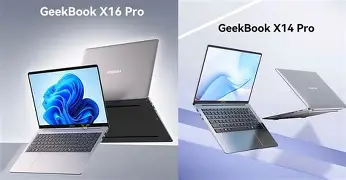
The Geekom Geekbook X14 Pro offers modern port selection—USB4/Thunderbolt-capable USB-C, USB-A, HDMI and a 3.5mm jack—allowing direct connection to external monitors, docks and legacy accessories. Its internal PCIe NVMe storage is typically user-upgradeable, whereas the tablet uses fixed internal storage (expandable via microSD on some models).
Software and ecosystem
Android on the OnePlus Pad Go 2 is optimized for touch-first interaction and the app ecosystem is strong for media, streaming and mobile-first productivity apps. Offline tablet-centric workflows and Android-friendly creative apps (painting, note apps) run smoothly.
Windows on the Geekbook X14 Pro provides access to full desktop software such as Adobe Creative Cloud, Visual Studio, Office desktop, virtualization tools and many specialized professional applications. For users who require those applications or enterprise compatibility, Windows is decisive.
Pros & Cons
OnePlus Pad Go 2
- Pros: Extremely portable and light; long battery life for media use; comfortable handheld display with 90 Hz refresh; quad speakers with strong audio; stylus support and microSD expansion; lower-cost entry point for users who want a tablet.
- Cons: Limited for heavy multitasking or desktop-class apps; single USB-C port limits direct peripheral connectivity; less suitable for heavy productivity without keyboard accessory; lower raw CPU/GPU performance.
Geekom Geekbook X14 Pro
- Pros: High-resolution 2.8K OLED display with 120 Hz; Windows desktop environment and support for professional software; powerful Intel Core Ultra CPUs and high RAM configurations; versatile port selection including USB4 and HDMI; excellent keyboard for extended typing; lightweight for a laptop.
- Cons: Heavier and less pocketable than a tablet; higher price in top configurations; battery life varies significantly with workload (OLED and high-performance CPU can consume more power under load); RAM typically soldered—limited post-purchase memory upgrades.
Real-world use cases
Students and casual users
For students who prioritize note-taking, reading, streaming lectures and light document editing, the OnePlus Pad Go 2 is often ideal. Its stylus capability, low weight and long standby make it convenient for classes and study sessions. Paired with a Bluetooth keyboard, it can handle essay writing and light spreadsheet work.
Looking for the best Laptops & Computers deals on Amazon?
See Deals →Remote workers and professionals
Professionals who depend on full desktop apps—specialized accounting software, Windows-only enterprise tools, full-featured Office apps or local development environments—will find the Geekom Geekbook X14 Pro more suited to their workflows. The physical keyboard and port selection simplify multi-monitor setups and extended sessions.
Content creators and photo/video editors
Light photo editing, sketching and video trimming can be done on both, but the X14 Pro’s OLED panel and stronger CPU provide a better environment for color-critical work and rendering tasks. Creators who want to run desktop-grade editing software will prefer the laptop.
Frequent travelers and commuters
If absolute weight and convenience are the main concern—reading on flights, streaming content on the go, navigating and light work—the OnePlus Pad Go 2 is the most portable option. For travelers who need a single device for both travel and serious productivity, the Geekbook X14 Pro strikes a balance between portability and capability.
Buying guide: How to choose between the two
Deciding between the OnePlus Pad Go 2 and the Geekom Geekbook X14 Pro comes down to use case, software needs and how much productivity matters versus pure portability. Below are practical questions and considerations to guide the purchase.
- Which operating system do you need? Choose Android (Pad Go 2) for a tablet-first, touch-driven experience and access to mobile apps; choose Windows (X14 Pro) if desktop apps and enterprise compatibility are required.
- Do you type for hours each day? If yes, the laptop with a built-in keyboard will be more comfortable. If not, a tablet + keyboard accessory may be acceptable.
- How important is display quality? For color-critical work, a 2.8K OLED is preferable. For media consumption and casual editing, the tablet’s display is still very capable.
- Do you need ports and expandability? Choose the X14 Pro if direct HDMI, USB4 and upgradeable SSD are important. Choose the Pad Go 2 for lighter, simpler connectivity and microSD expansion.
- Is battery life a priority? For long media sessions and lighter workloads, the tablet usually yields longer endurance; for continuous moderate productivity on Windows, the laptop is optimized for an all-day workflow but will vary with workload.
- Budget and value: Tablets often provide lower entry prices for basic models; laptops with higher RAM and SSD options become more expensive but deliver more performance. Balance the spec level against the specific software and multitasking needs.
- Accessories: Consider costs of a keyboard case, stylus, external monitor or dongles when calculating total spend.
Conclusion
The OnePlus Pad Go 2 and the Geekom Geekbook X14 Pro represent two sensible choices for modern mobile computing, but they serve different core needs. The OnePlus Pad Go 2 is an excellent mid-range tablet for users who prioritize light weight, long media-friendly battery life, stylus-based workflows and casual productivity. It is especially attractive for students, commuters and anyone who values a highly portable form factor.
The Geekom Geekbook X14 Pro is aimed at buyers who need full desktop-grade software support, superior display fidelity, and a mechanical keyboard for extended typing—without sacrificing extreme portability. It suits professionals, creators and power users who require a compact device capable of handling more demanding workloads.
Ultimately, the right choice depends on whether the buyer’s day-to-day tasks lean toward touch-driven media and note-taking or toward desktop applications and sustained productivity. Both devices deliver strong experiences in their respective categories; careful consideration of operating system needs, accessory costs and primary use cases will help prospective buyers select the device that best matches their lifestyle.