A Professional's Take on the New Ugreen M571 Wireless Vertical Mouse
Introduction
The modern workspace has undergone a radical transformation over the last decade. As more professionals transition to hybrid or fully remote roles, the physical setup of the desk has become a primary concern for productivity and long-term health. Among the most critical yet often overlooked components of this setup is the computer mouse. For several decades, the standard horizontal mouse has been the default. However, as repetitive strain injuries (RSI) and carpal tunnel syndrome become increasingly common in the digital workforce, ergonomic alternatives have moved from the periphery to the mainstream. The Ugreen M571 Wireless Vertical Mouse represents a significant entry into this growing market, promising a professional-grade experience that combines comfort with the technical reliability users have come to expect from the brand.
A vertical mouse is fundamentally different from its traditional counterpart. Instead of laying the palm flat against the desk surface—a position that requires the radius and ulna bones in the forearm to cross—a vertical mouse allows the hand to rest in a "handshake" position. This natural alignment reduces muscular tension in the forearm and minimizes pressure on the median nerve. For professionals spending eight to twelve hours a day at a laptop or workstation, this shift is not merely about comfort; it is about extending the longevity of one’s career. The Ugreen M571 aims to capture this professional demographic by offering a balance of high-precision tracking, multi-device connectivity, and a refined aesthetic that fits seamlessly into a modern office environment.
Detailed Product Analysis
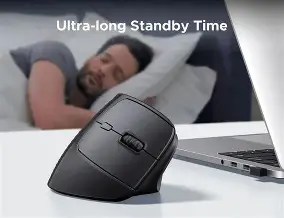
The Ugreen M571 is designed with a 57-degree vertical angle, which is often cited by ergonomists as the "sweet spot" for anatomical alignment. This angle provides enough of a tilt to alleviate forearm twisting without being so steep that it feels alien to long-time horizontal mouse users. The build quality feels substantial, utilizing high-grade plastics with a matte finish that resists fingerprints—a small but appreciated detail for those who value a clean workspace. The surface texture provides just enough grip to ensure the hand doesn't slide down during high-intensity tasks, yet it remains smooth enough for comfort during longer, passive browsing sessions.
Precision and Performance
From a technical standpoint, the M571 is equipped with a high-performance optical sensor capable of reaching up to 4000 DPI. For professionals working on high-resolution displays or multi-monitor laptop setups, DPI (dots per inch) is a crucial metric. A higher DPI allows the cursor to traverse a 4K screen with minimal physical movement of the hand, further reducing the strain on the wrist. The mouse typically offers adjustable DPI levels (usually ranging from 1000 to 4000), allowing users to switch between high-speed navigation and pixel-perfect precision required for tasks like photo editing, CAD work, or complex spreadsheet management.
The polling rate and latency are equally impressive for a non-gaming wireless peripheral. Using a 2.4GHz wireless connection via a Nano receiver or Bluetooth 5.0/3.0, the mouse provides a lag-free experience. This dual-mode connectivity is particularly beneficial for laptop users who may have limited USB-A ports; the ability to connect via Bluetooth frees up a port for external drives or charging cables. Furthermore, the inclusion of "Silent Click" technology makes it an ideal companion for open-office plans or late-night work sessions at home where noise can be a distraction.
Ergonomic Features and Layout
Beyond the primary left and right-click buttons, the Ugreen M571 incorporates several navigation-friendly controls. There are forward and backward buttons positioned near the thumb rest, which are indispensable for web research and file navigation. The scroll wheel is tactile and rubberized, offering distinct "steps" rather than a free-spinning motion, which provides better control when scrolling through long documents or lines of code. One of the standout design choices is the thumb ledge, which prevents the thumb from rubbing against the mousepad. This reduces friction and makes the overall movement of the mouse feel lighter than its actual weight would suggest.
Battery management is another area where the M571 shows its professional leanings. Most users prefer a device that they don't have to worry about daily. Through efficient power management and an auto-sleep function that kicks in after a few minutes of inactivity, the mouse can last for several months on a single set of batteries. This reliability is paramount for travelers who don't want to carry extra chargers or worry about their peripheral dying during a critical presentation.
Shop the latest Laptops & Computers picks on Amazon.
Browse Now →Pros and Cons
- Significant Ergonomic Relief: The 57-degree angle immediately reduces forearm pronation, providing relief for users suffering from wrist fatigue or early signs of RSI.
- Dual-Mode Connectivity: Support for both 2.4GHz wireless and Bluetooth allows for seamless switching between a laptop, a tablet, or a desktop PC.
- Silent Operation: The dampened click mechanism is nearly noiseless, making it perfect for quiet environments like libraries or shared workspaces.
- High DPI Customization: Adjustable sensitivity up to 4000 DPI ensures the mouse remains responsive on large, high-resolution monitors.
- Thoughtful Thumb Support: The integrated thumb rest prevents skin-to-surface friction, enhancing the fluid feel of the device during movement.
- Professional Aesthetic: The sleek, minimalist design and neutral color palette allow it to blend into any corporate or creative office setting.
- Learning Curve: Users transitioning from a flat mouse may take several days to build the muscle memory required for accurate clicking without moving the mouse slightly.
- Portability Index: Due to its vertical height, it takes up more vertical space in a laptop bag than a traditional "travel" mouse.
- Right-Hand Only: Like most ergonomic vertical mice, this model is specifically contoured for right-handed users, leaving left-handed professionals without an equivalent option in this specific design.
- Battery Type: While long-lasting, some users may prefer a built-in rechargeable Lithium-ion battery over replaceable AA/AAA cells, though this is often a matter of personal preference regarding longevity versus convenience.
Professional Use Cases
To understand the value of the Ugreen M571, it is helpful to look at how different types of professionals might engage with it. For a Data Analyst, the variable DPI is the hero feature. When moving between massive datasets on a 32-inch monitor and a 13-inch laptop screen, the ability to quickly toggle sensitivity ensures that the cursor speed remains consistent and manageable. The ergonomic tilt prevents the inevitable ache that comes from hours of intense mouse-clicking during data cleaning and visualization.
For a Software Developer, the silent clicks and multi-device pairing are essential. Many developers work across multiple machines—perhaps a MacBook for front-end work and a Linux machine for server-side tasks. The dual Bluetooth and 2.4GHz receiver allow them to control different environments with a single peripheral, maintaining a "flow state" without the friction of swapping hardware. Furthermore, the vertical orientation helps prevent "Tech Neck" and associated shoulder tension by encouraging a more upright, neutral posture.
Even for Administrative Professionals or content creators, the Ugreen M571 simplifies the workday. Constantly navigating through browser tabs, email clients, and project management tools involves thousands of clicks. By shifting the load from the small muscles of the wrist to the larger muscles of the arm and shoulder, the M571 mitigates the risk of cumulative trauma. It turns a tool of labor into a tool of health.
Comparative Analysis
When selecting an ergonomic mouse, it is important to see how the Ugreen M571 stacks up against other standard and ergonomic categories. While there are "extreme" vertical mice with a 90-degree angle and "semi-vertical" mice with a 25-degree tilt, the 57-degree angle is widely considered the industry standard for general professional use.
| Feature | Ugreen M571 Vertical | Standard Horizontal Mouse | Compact Travel Mouse |
|---|---|---|---|
| Forearm Strain | Low (Neutral Position) | High (Pronated Position) | Very High (Claw Grip) |
| DPI Range | Up to 4000 (Adjustable) | 800 - 1600 (Fixed) | 800 - 1200 (Fixed) |
| Connectivity | 2.4GHz + Bluetooth | Wired or 2.4GHz | Bluetooth Only |
| Click Volume | Silent/Dampened | Standard Click | Standard Click |
| Desk Footprint | Moderate (Vertical Height) | Low to Moderate | Very Low |
Professional Buying Guide
Buying an ergonomic mouse is a personal decision, but there are several objective criteria that every professional should consider before making the switch. The Ugreen M571 targets specific needs, but you should evaluate these factors against your own workflow.
1. Hand Size and Grip Style
The M571 is generally designed for medium to large hands. Because it requires a "palm grip"—where the entire hand rests on the device—it is important that your fingers reach the buttons comfortably without stretching. If you have very small hands, you may find the reach to the top scroll wheel a bit of a stretch. Conversely, those with very large hands will appreciate the substantial body of the M571, as it prevents the "pinky dragging" that often occurs with smaller horizontal mice.
Looking for the best Laptops & Computers deals on Amazon?
View Offers →2. Workspace Environment
Consider where you do most of your work. If you are a "digital nomad" or frequently work from coffee shops and narrow airplane trays, the vertical height of the M571 might be a minor hindrance compared to a flat, pocketable mouse. However, if you have a dedicated desk or a laptop stand setup, the ergonomic benefits far outweigh the portability concerns. The silent click feature is also a major plus for those who work in shared environments where repetitive clicking can be perceived as an annoyance by colleagues.
3. Connectivity Requirements
Do you use a modern laptop with only USB-C ports? If so, you will likely rely on the Bluetooth connection of the M571 rather than the USB-A Nano receiver. Ensure your laptop's operating system is compatible with Bluetooth 5.0 for the best energy efficiency and lowest latency. The M571 is highly versatile here, supporting Windows, macOS, and even ChromeOS or iPadOS, making it a great "all-in-one" solution for users with diverse hardware ecosystems.
4. The Adjustment Period
Prospective buyers should be aware that switching to a vertical mouse involves a transitional period. For the first few hours, your clicking accuracy might be slightly lower as you adjust to the side-clicking motion. Some users find that they accidentally move the mouse when clicking until they learn to "pinch" the mouse slightly with their thumb to provide counter-pressure. Typically, it takes about three to five days of consistent use for the vertical position to feel like second nature.
Conclusion
The Ugreen M571 Wireless Vertical Mouse is more than just a peripheral; it is a specialized tool designed for the modern professional who views their desk setup as an investment in their health and efficiency. By successfully merging a scientifically-backed 57-degree ergonomic angle with modern technical features like 4000 DPI tracking and dual-mode wireless connectivity, Ugreen has created a compelling product for anyone spending significant time at a computer. While it may not be the first choice for highly mobile users who prioritize thinness above all else, for the vast majority of laptop users and office workers, the reduction in muscle fatigue and the improvement in overall comfort are transformative.
In a market where ergonomic mice can often be prohibitively expensive or lack the build quality necessary for daily professional use, the M571 stands out as a balanced, reliable, and aesthetically pleasing option. It addresses the core concerns of the digital workforce—comfort, noise, precision, and connectivity—without unnecessary gimmicks. For those looking to move away from the traditional horizontal mouse and adopt a healthier, more natural way of working, the Ugreen M571 provides a smooth transition into the world of ergonomic excellence. As we continue to blur the lines between home and office, tools that prioritize our physiological well-being will inevitably become the standard, and the M571 is a strong step in that direction.